
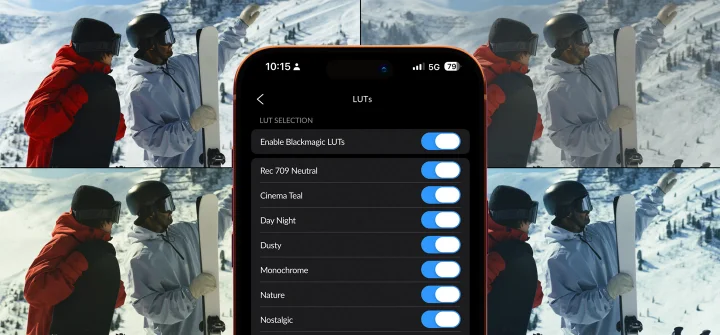
Searching for a Blackmagic Camera app LUTs free download? Ten free LUTs already ship inside the app, so there’s nothing extra to download.
Install the APK on your phone from blackmagiccameraapk.net first, since every LUT described below lives inside that same free app.
How to Find the Built In LUTs
A LUT applies a preset color style to your footage, changing its look with one tap. Each one already lives inside the app, with nothing extra to install or buy.
Open the app and tap the LUT button below the camera picker. This opens a LUT picker showing every LUT currently active on your device.
Settings, then LUTs, then LUT Manager controls which LUTs show up in that list. Toggle any LUT on or off from there, so only the looks you actually use stay visible.
Preview Mode vs Recording Mode
A LUT applies two different ways, and the difference matters before you record. Preview mode shows the look on screen, but the file you save stays untouched.
Recording mode bakes that same look directly into the saved file. Once applied this way, the original flat footage underneath is gone. Choose preview mode instead if you plan to grade the footage later in an editor.
How to Export a LUT for DaVinci Resolve or Premiere Pro
The app can send a LUT out to your computer, matching the same look during later editing. Open Settings, then LUTs, then Export LUT, and pick the LUT you want to send.
That exported file works inside Premiere Pro’s LUT settings or any editor that reads standard LUT files. The same look also matters on Blackmagic RAW footage from Blackmagic’s cinema cameras. Read what Blackmagic RAW actually is to see why that format holds more color information for a LUT to shape.
Takes you to the download page.
Frequently Asked Questions
Do LUTs require a separate download for the Blackmagic Camera app?
No. Ten free LUTs already ship inside the app, ready to use without any extra download.
Can I remove a LUT once I record it into a clip?
No. A LUT applied in recording mode becomes part of the file. Preview mode avoids this, since the LUT only appears on screen while shooting.
Where do exported LUTs get saved?
Exported LUTs save to your phone’s storage, ready to transfer to a computer for use in an editor.
Does using a LUT change the raw footage underneath?
Only in recording mode. Preview mode keeps the underlying footage completely unchanged.